
Block an IP or a range
All traffic from a blocked address is dropped before reaching your server. It’s the answer to an identified attacker, for example an address that keeps showing up in the Top attackers on the dashboard.
Go to Anti-DDoS → Management → IP blocking:
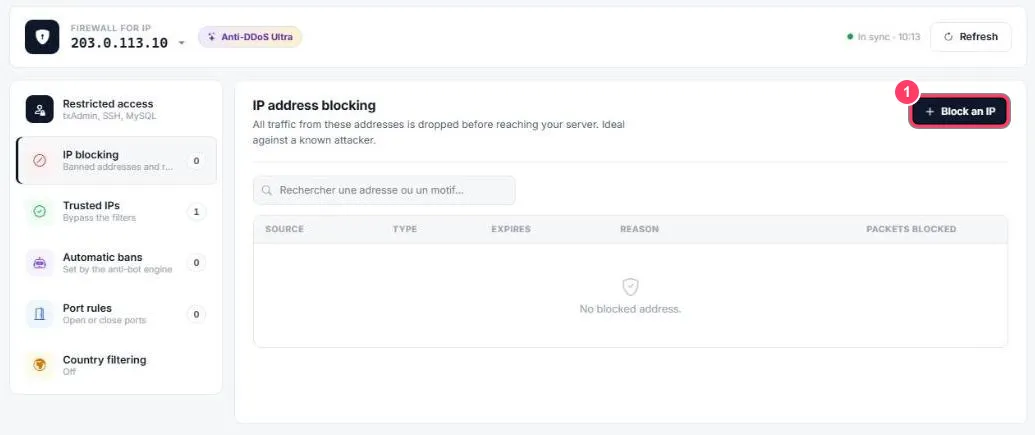
- Click Block an IP. The table below lists blocked addresses: source, type, expiry, reason and number of packets blocked. The search box finds an address or a reason
The block form
Section titled “The block form”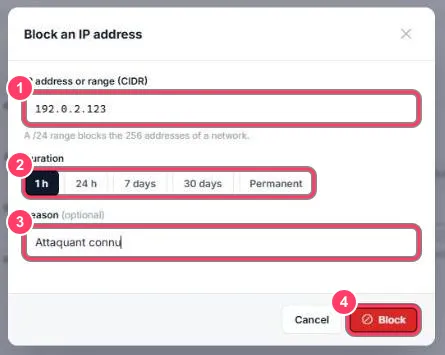
- IP address or range (CIDR): an address (
203.0.113.7) or a whole range (203.0.113.0/24blocks the 256 addresses of that network) - Duration: 1 h, 24 h, 7 days, 30 days or Permanent
- Reason (optional): a word to remember why, e.g. UDP flood or connection spam
- Block: the block applies immediately
To unblock an address early, delete it from the list.