
Change the database password (phpMyAdmin)
The database root password is used both by phpMyAdmin and by your FiveM server (mysql_connection_string line in server.cfg). Change it if you think it leaked, if a former staff member knew it, or simply to pick a stronger one.
Method 1: from phpMyAdmin (easiest)
Section titled “Method 1: from phpMyAdmin (easiest)”Open phpMyAdmin
Section titled “Open phpMyAdmin”- On the VPS dashboard, phpMyAdmin block, click Voir (Show) to reveal the current password, then Ouvrir phpMyAdmin (Open phpMyAdmin)
- Sign in with the
rootuser and that password
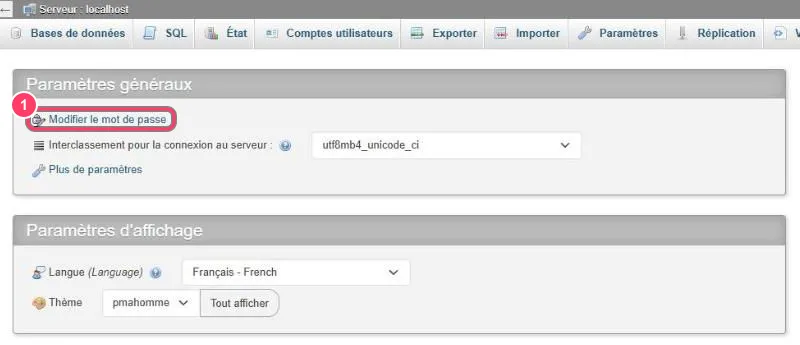
- Modifier le mot de passe (Change password): changes the password of the account you are signed in with (
root)
Change the password
Section titled “Change the password”Click Modifier le mot de passe under Paramètres généraux (General settings):
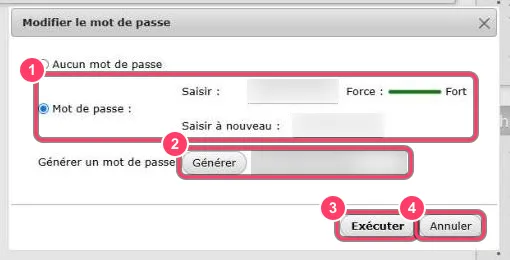
- Keep Mot de passe (Password) ticked, then type the new password in Saisir (Enter) and Saisir à nouveau (Re-type). The Force (Strength) gauge should be green (Fort / Strong)
- Or click Générer (Generate): phpMyAdmin creates a strong random password, shows it in the field on the right and fills both fields. Copy it right away
- Exécuter (Go) applies the change
- Annuler (Cancel) closes the dialog without changing anything
After Exécuter, phpMyAdmin signs you out: sign back in with the new password.
Then go to the final step.
Method 2: over SSH (advanced)
Section titled “Method 2: over SSH (advanced)”Useful if phpMyAdmin isn’t reachable, or if you prefer the command line.
1. Connect to the VPS
Section titled “1. Connect to the VPS”ssh root@YOUR_VPS_IPYour SSH credentials are in the VPS Security → SSH Access tab (see VPS security).
2. Open the MariaDB console
Section titled “2. Open the MariaDB console”mariadb -u root -pType the current database password (nothing shows while typing, that’s normal). The prompt becomes MariaDB [(none)]>.
3. Change the password
Section titled “3. Change the password”Replace NewPassword with your password, keeping the quotes:
ALTER USER 'root'@'localhost' IDENTIFIED BY 'NewPassword';FLUSH PRIVILEGES;EXIT;Both commands should answer Query OK.
4. Check
Section titled “4. Check”mariadb -u root -p -e "SELECT 'connection OK';"Type the new password: the command should print connection OK.
Forgot the current password?
Section titled “Forgot the current password?”If you no longer know the current password and Voir in the portal no longer works, you can reset it by restarting MariaDB without privilege checks:
systemctl stop mariadbmariadbd-safe --skip-grant-tables --skip-networking &sleep 5mariadb -u rootThen in the MariaDB console:
FLUSH PRIVILEGES;ALTER USER 'root'@'localhost' IDENTIFIED BY 'NewPassword';EXIT;Finally, restart MariaDB normally:
mariadb-admin -u root -p shutdownsystemctl start mariadbsystemctl status mariadb --no-pagerFinal step: update server.cfg
Section titled “Final step: update server.cfg”Your FiveM server uses the password in the mysql_connection_string line of your server.cfg (or in a framework config file). Update it with the new password:
set mysql_connection_string "mysql://root:NewPassword@127.0.0.1/fivem?charset=utf8mb4"Then restart the server from txAdmin and check the console shows no connection error (Access denied for user 'root').
Going further
Section titled “Going further”- Close MySQL to the public with Anti-DDoS restricted access: only your IPs will reach port
3306 - For a script or a developer, create a dedicated user in Comptes utilisateurs → Ajouter un compte d’utilisateur (Add user account), with rights limited to the
fivemdatabase, instead of sharingroot