
txAdmin protection
txAdmin is a web page: it can be hit by HTTP attacks (thousands of requests per second). The txAdmin tab on the Anti-DDoS page shows how it is protected.
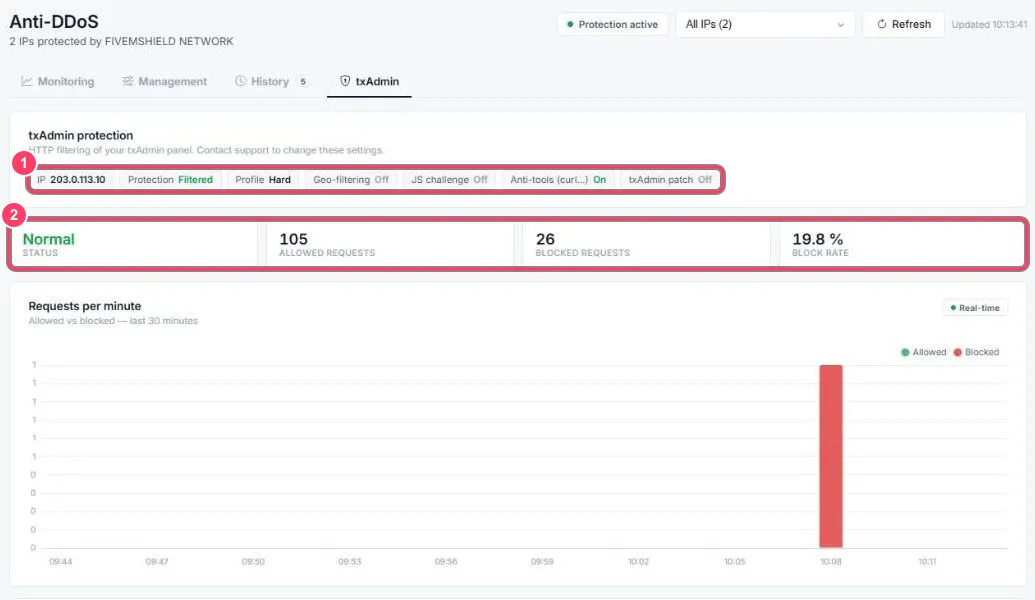
-
Active settings:
- the protected IP and state (Filtered)
- the profile (e.g. Hard)
- options: geo-filtering, JavaScript challenge, blocking automated tools like
curl, txAdmin patch
To change them, contact support
-
Counters: status, allowed requests, blocked requests and block rate
Further down:
- Requests per minute: allowed (green) and blocked (red) requests over the last 30 minutes
- Live feed: the last 10 requests received, with time, status, method, path and block reason
- Attacks on txAdmin: past HTTP attacks, with duration, blocked requests, peak and number of IPs
Attack details
Section titled “Attack details”Click an attack in the Attacks on txAdmin list to show its details:
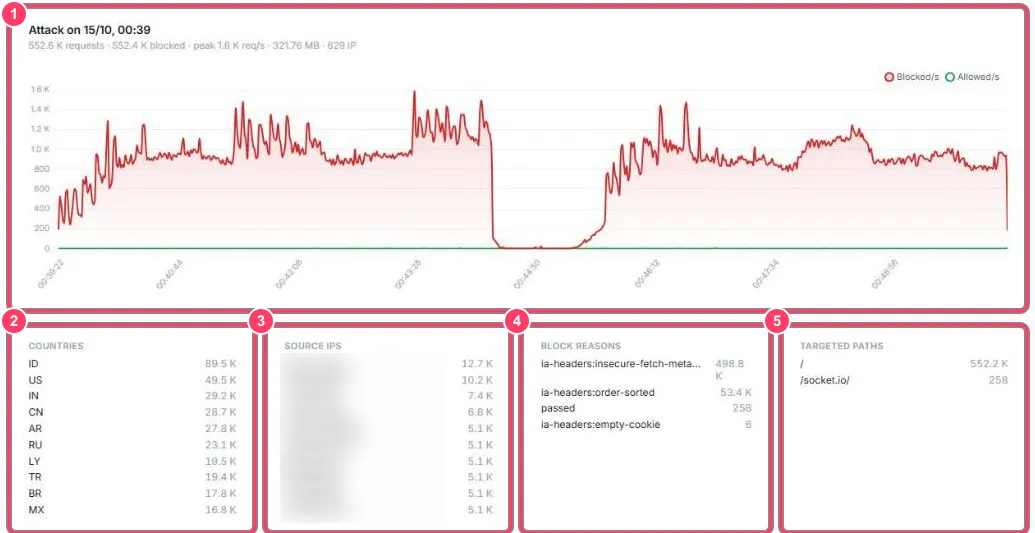
- Chart: blocked (red) and allowed (green) requests per second during the attack, with the summary (requests, blocked, peak, volume, number of IPs)
- Countries: where requests came from
- Source IPs: addresses that sent the most requests
- Block reasons: why requests were blocked (suspicious headers, rate limit…)
- Targeted paths: pages targeted