
Share a service with a sub-user
Sub-users let another person (partner, developer, staff) access one of your services, with only the rights you choose. They never get access to your account, balance or invoices.
The person must first create their FIVEMSHIELD account. Then go to Sub-users:
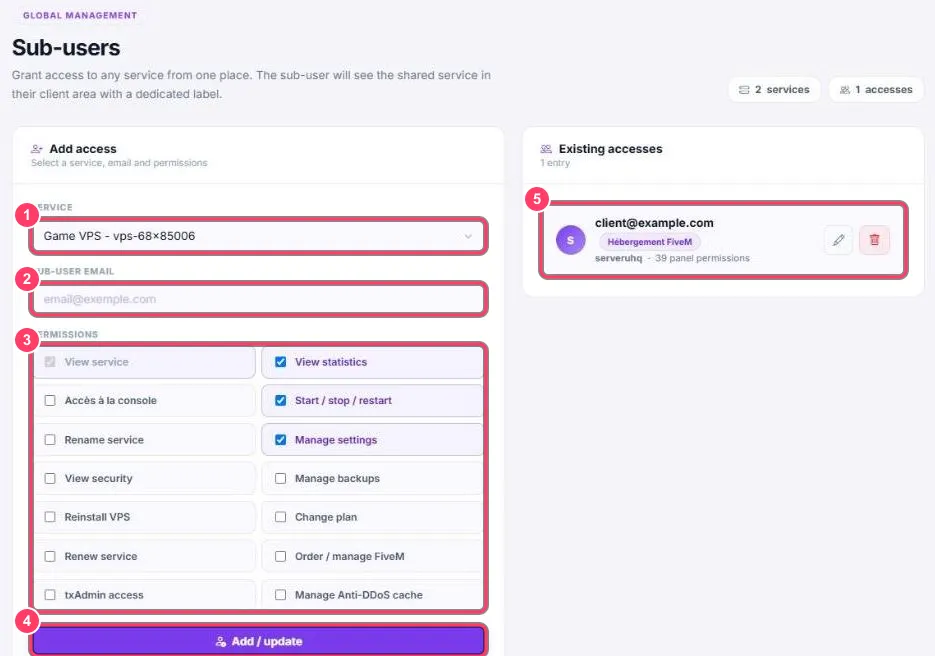
- Service: pick the VPS or FiveM server to share
- Sub-user email: the email of the person’s FIVEMSHIELD account
- Permissions: tick only what they need (details below)
- Add / update: saves the access. The service shows up in the person’s portal, with a dedicated label
- Existing accesses: the accesses already granted. See Edit or remove an access
Permissions
Section titled “Permissions”| Permission | What it allows |
|---|---|
| View service | See the service (always ticked) |
| View statistics | See statistics |
| Accès à la console | Use the console |
| Start / stop / restart | Start, stop, restart |
| Rename service | Rename the service |
| Manage settings | Change settings |
| View security | See the Security tab (credentials included) |
| Manage backups | Manage backups |
| Reinstall VPS | Reinstall the VPS (wipes everything) |
| Change plan | Change plan |
| Renew service | Renew the service |
| Order / manage FiveM | Order or manage FiveM hosting |
| txAdmin access | Access txAdmin |
| Manage Anti-DDoS cache | Manage the Anti-DDoS cache |