
Reinstall your VPS
Reinstalling wipes the whole VPS and installs a fresh system. It’s useful if the server is broken, infected, or if you want a clean start.
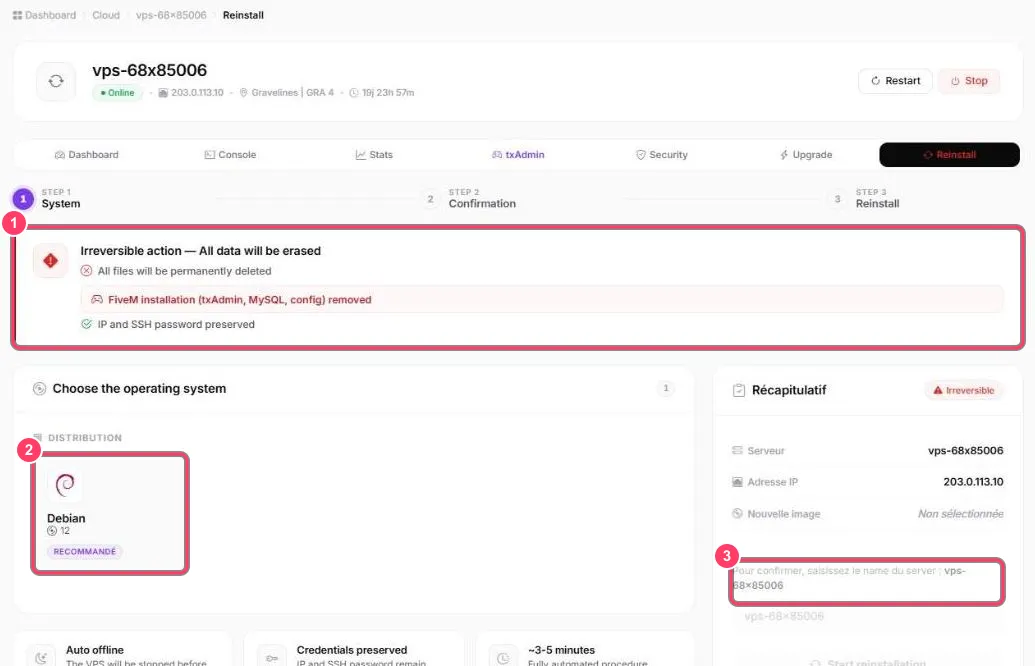
- Irreversible action: all files are deleted, including the FiveM install (txAdmin, MySQL, configuration). However, the IP and SSH password are kept
- Choose the operating system: Debian 12 is recommended
- Confirmation: type the server name (for example
vps-68x85006) in the field, then Start reinstallation. A final confirmation is asked
The VPS is stopped automatically, then the reinstall takes 3 to 5 minutes.
After the reinstall, set up txAdmin again.