
Open or close a port
Without a rule, the default filters apply. A port rule lets you open a legitimate port blocked by mistake, or close a port you don’t use.
Go to Anti-DDoS → Management → Port rules:
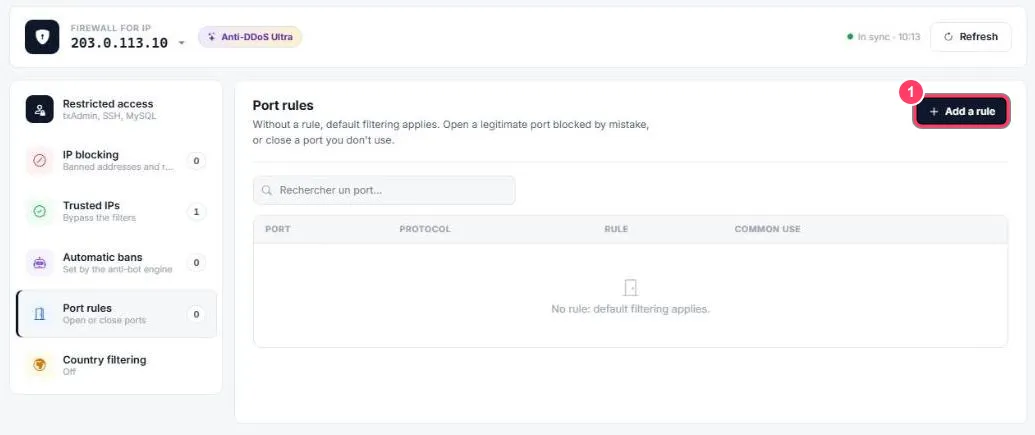
- Click Add a rule. The table lists your rules: port, protocol, rule and common use. No rule: default filtering applies means only the default filters are active
The form
Section titled “The form”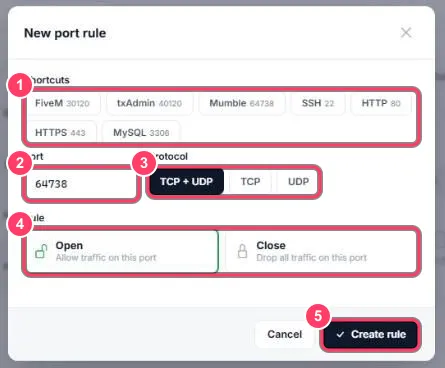
- Shortcuts: fill the port in one click: FiveM
30120, txAdmin40120, Mumble64738, SSH22, HTTP80, HTTPS443, MySQL3306 - Port: or type any port by hand
- Protocol: TCP + UDP, TCP or UDP
- Rule: Open (allow traffic on this port) or Close (drop all traffic on this port)
- Create rule: the rule applies immediately