
Filter by country
Country filtering is useful for a server aimed at a single region, for example a French-speaking RP server, or to cut an attack coming from a country where you have no players.
Go to Anti-DDoS → Management → Country filtering:
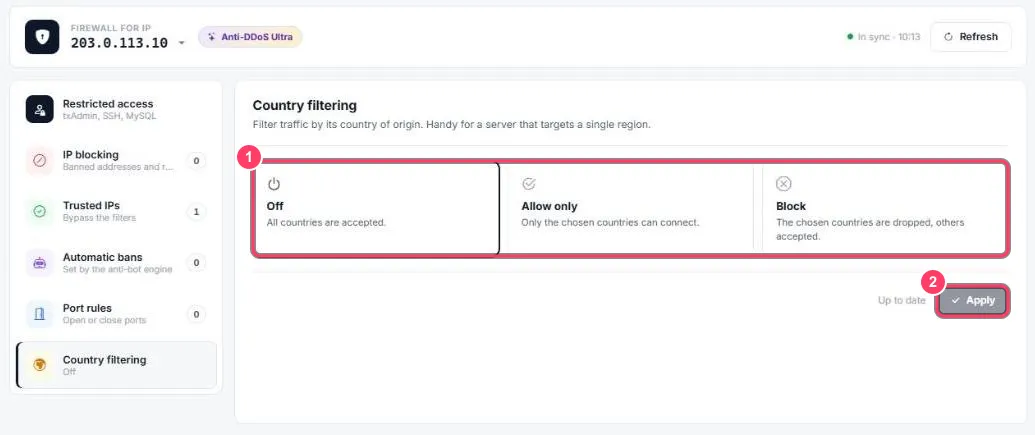
By default the mode is Off: all countries are accepted.
Set up filtering
Section titled “Set up filtering”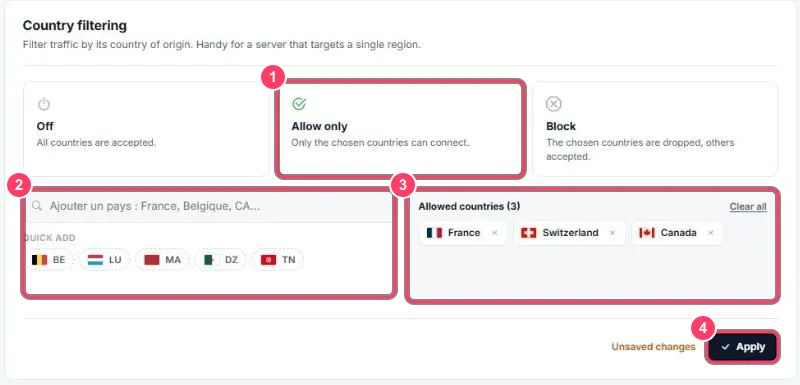
- Mode:
- Off: all countries are accepted
- Allow only: only the chosen countries can connect
- Block: the chosen countries are dropped, others accepted
- Add countries: type a country name in the search box, or use Quick add (France, Belgium, Switzerland, Luxembourg, Canada, Morocco, Algeria, Tunisia)
- The list of chosen countries. The ✕ removes one, Clear all empties the list
- Apply: until you click it, Unsaved changes is shown and nothing is applied
The Country filtering menu entry then summarises the setting (e.g. Allowed: 3 countries).