
Access the Game Panel and your server
The FIVEMSHIELD Game Panel is where you manage your FiveM server: console, files, database, backups, txAdmin…
Sign in
Section titled “Sign in”- Go to gamepanel.fivemshield.net
- Sign in with the credentials you received when ordering
Open your server
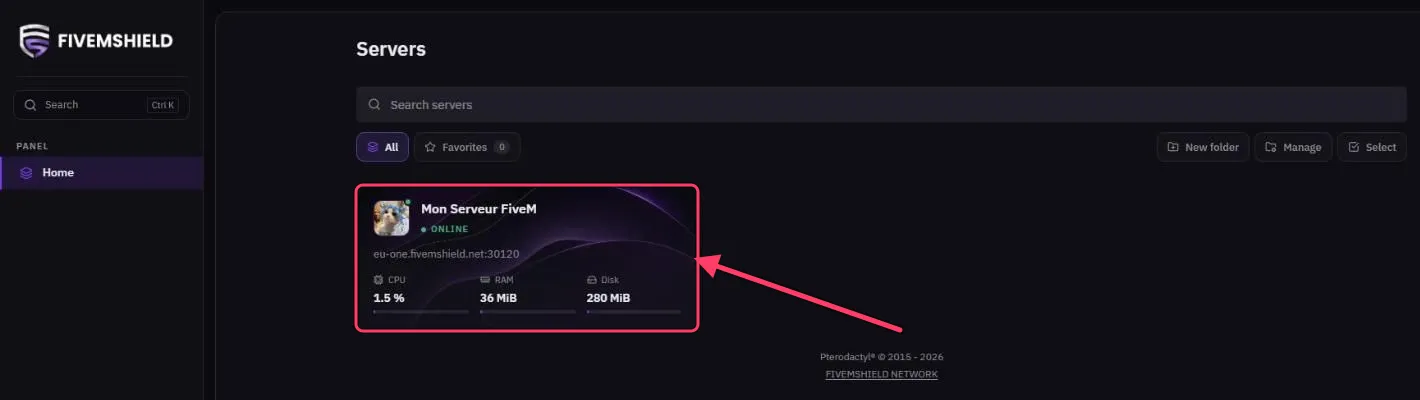
Section titled “Open your server”Once signed in, the Servers page lists all your servers. Each card shows:
- your server’s name and logo,
- its status (Online, Offline, Starting…),
- its connect address (e.g.
eu-one.fivemshield.net:30120), - its live usage: CPU, RAM and Disk.
Click your server’s card to open it.
The server menu
Section titled “The server menu”The left-hand menu gives you access to every section of your server:
| Section | What it’s for |
|---|---|
| Console | Start / stop the server and run commands |
| txAdmin | Enable and open txAdmin |
| Statistics / Resource history | Monitor CPU, RAM, disk and network usage |
| Files | Manage your server files |
| Databases | Your MySQL database and phpMyAdmin |
| Backups | Create and restore backups |
| Startup | License key, player slots, server name… |
| Subdomains | Create an easy-to-remember address |
| Users | See subusers |
| Activity | History of actions performed on the server |