
Manage your Windows VPS: the dashboard
In VPS Windows, click Manage next to your VPS.
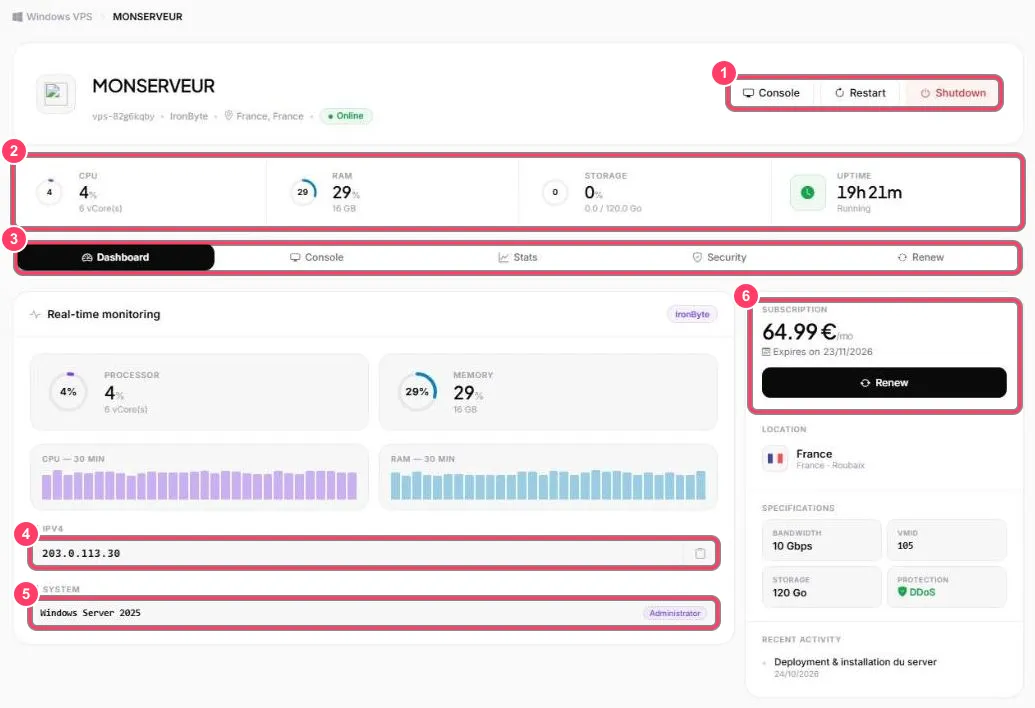
- Actions: Console opens the VPS screen in the browser, Restart reboots it, Shutdown turns it off
- Resources: CPU, memory, storage and time since last boot (Uptime)
- Tabs: Dashboard, Console, Stats, Security and Renew
- IPv4: your VPS IP address, with a copy button. It’s the one you use for Remote Desktop
- System: the installed system (Windows Server 2025) and the administrator account
- Subscription: monthly price, expiry date and Renew button
The right-hand column also shows the location (France · Roubaix), the specifications (bandwidth, storage, DDoS protection) and the VPS’s recent activity.