
Manage your FiveM server from the portal
In FiveM Hosting, click Manage next to your server.
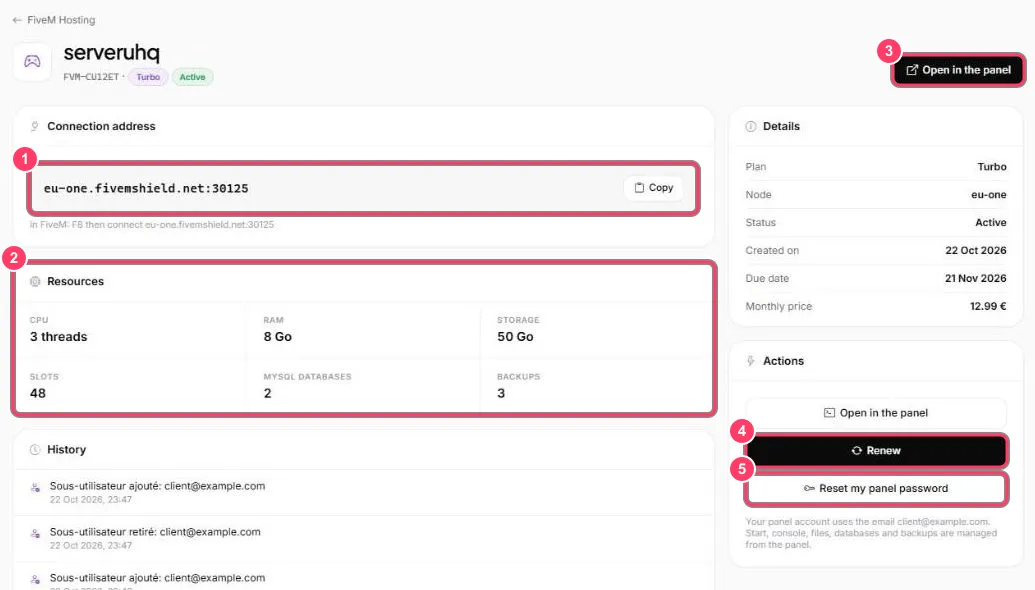
- Connection address: the address to give your players. Copy copies it. In FiveM, press F8 and type
connectfollowed by the address - Resources: what your plan includes (CPU, RAM, storage, slots, MySQL databases, backups)
- Open in the panel: opens your server in the Game Panel, where you start it and manage the console, files, databases and backups
- Renew: extends the server. The due date is under Details → Due date
- Reset my panel password: see Reset your Game Panel password
The History block lists the server’s events (creation, sub-users added or removed…).