
Set up the cache on your server
Open your cache from CDN & Caching → Manage, then scroll down to the server.cfg configuration block.
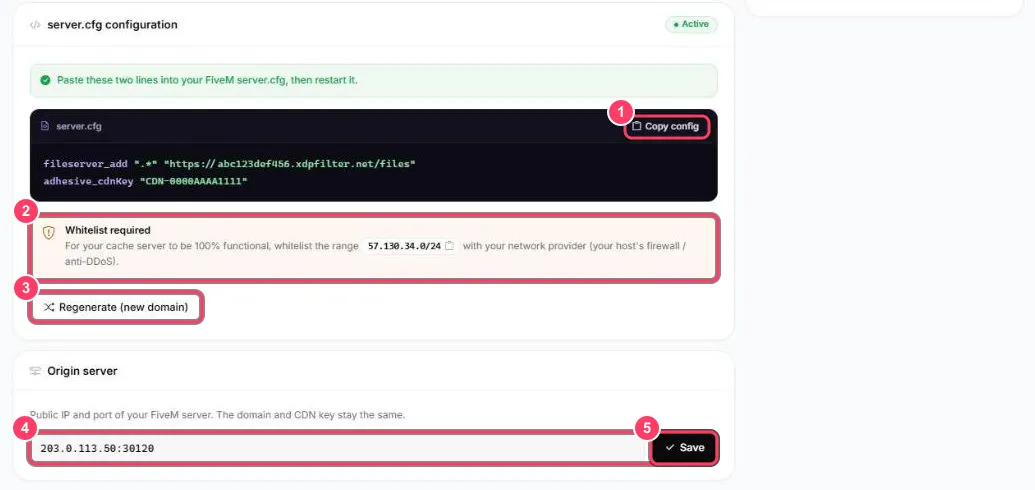
- Copy config copies the two lines to add
- Whitelist required: the
57.130.34.0/24range to allow at your host - Regenerate (new domain): creates a new cache domain
- Origin server: your FiveM server’s public IP and port
- Save stores a new server address
Step 1: add the lines to server.cfg
Section titled “Step 1: add the lines to server.cfg”Paste the two lines into your server.cfg then restart your server:
fileserver_add ".*" "https://abc123def456.xdpfilter.net/files"adhesive_cdnKey "CDN-0000AAAA1111"| Line | Purpose |
|---|---|
fileserver_add ".*" "https://…/files" |
Tells players to download all resources (.*) from your cache |
adhesive_cdnKey "CDN-…" |
The key that lets the cache fetch files from your server |
Step 2: allow the cache in your firewall
Section titled “Step 2: allow the cache in your firewall”The cache must be able to fetch files from your server. Allow the 57.130.34.0/24 range in your host’s firewall or anti-DDoS:
- OVH: Manager → your server → IP → Network Firewall → Allow rule, IPv4, source
57.130.34.0/24, high priority (as for the Reverse Proxy) - Linux with ufw:
ufw allow from 57.130.34.0/24 - Other hosts: add an allow rule for this range in their panel
Without this rule, the cache can’t read your resources and players keep downloading from your server.
Check it works
Section titled “Check it works”After the restart, have a player join then look at the dashboard: Data served should go up and the Cache hit ratio should rise as players connect. The Active badge on the server.cfg configuration block confirms the cache is running.
Your server changes IP or port
Section titled “Your server changes IP or port”Under Origin server, type the new address (IP:port) then Save. The domain and key stay the same: no need to touch your server.cfg.
Regenerate the domain
Section titled “Regenerate the domain”Regenerate (new domain) creates a new cache domain. Use it if the old one is targeted by attacks or has leaked. After regenerating, copy the new lines into your server.cfg and restart: the old ones stop working.