
Start, stop and use the console
The Console page is your server’s home page. It shows everything your FiveM server writes to its logs in real time.
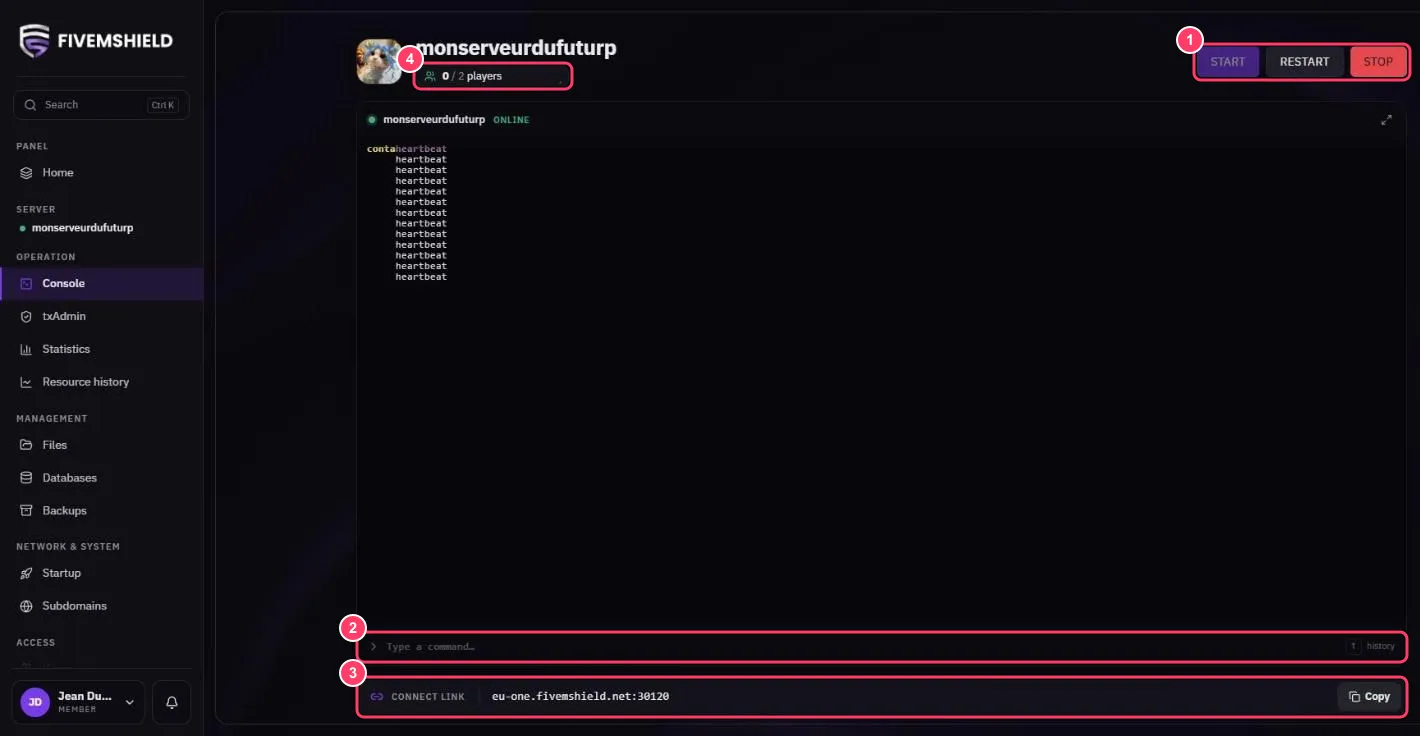
1. Start, restart, stop
Section titled “1. Start, restart, stop”| Button | What it does |
|---|---|
| START | Starts the server |
| RESTART | Stops then starts the server again |
| STOP | Gracefully stops the server |
2. Send a command
Section titled “2. Send a command”Type your command in the Type a command… field and press Enter. A few useful commands:
| Command | What it does |
|---|---|
refresh |
Reloads the resource list |
ensure resource_name |
Starts or restarts a resource |
stop resource_name |
Stops a resource |
status |
Lists connected players |
say message |
Sends a message to every player |
Press the ↑ key to bring back previous commands (history). The button in the top-right corner of the console switches to full screen.
3. The connect address
Section titled “3. The connect address”The CONNECT LINK bar shows the address your players use to join your server. Click Copy to copy it. See Join your server.
4. Connected players
Section titled “4. Connected players”Under the server name, the counter shows connected players / available slots.