
Read the cache dashboard
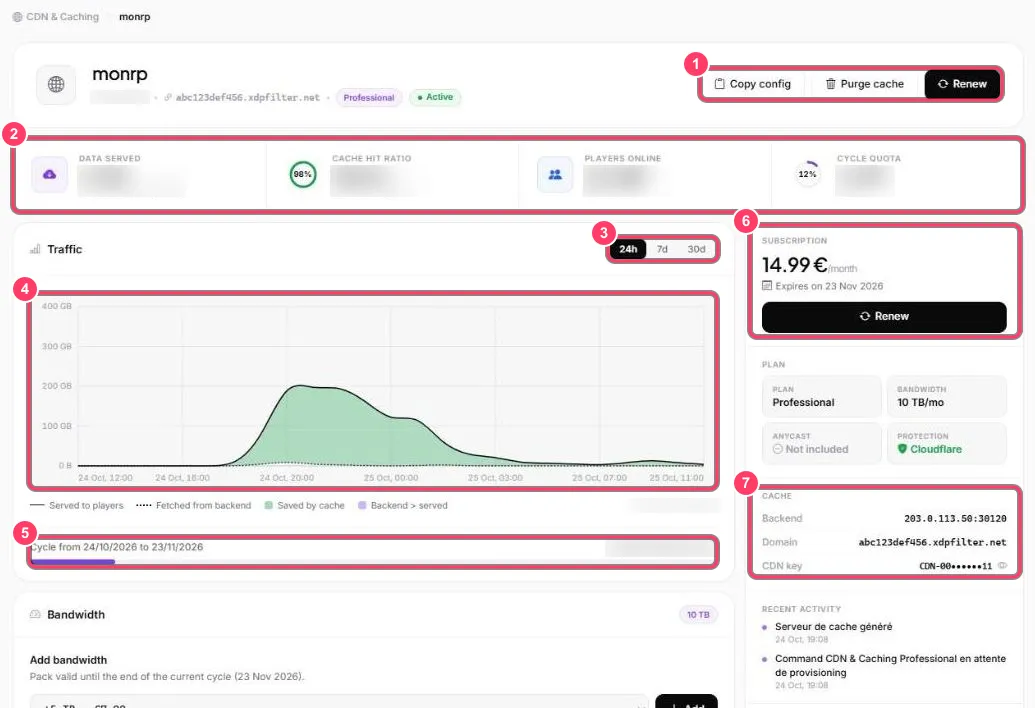
- Quick actions: Copy config (copies the
server.cfglines), Purge cache and Renew - Counters:
- Data served: volume sent to players, and volume saved for your server
- Cache hit ratio: share of downloads served straight from the cache. The closer to 100%, the better
- Players online: players connected to your server
- Cycle quota: bandwidth used in the current cycle
- Chart period: 24 h, 7 days or 30 days
- Traffic:
- Served to players (solid line): what players downloaded
- Fetched from backend (dotted line): what the cache had to fetch from your server
- Saved by cache (green area): the difference, saved for your server
- Cycle: billing cycle dates and usage against your quota
- Subscription: price, expiry date and Renew
- Cache: your server’s address (Backend), the cache domain and the CDN key (hidden, the 👁 icon reveals it)
The right-hand column also shows your plan (bandwidth, Anycast, protection) and the cache’s recent activity.