
Restrict txAdmin, SSH and MySQL to your IPs
txAdmin, SSH and MySQL don’t need to be reachable from the whole Internet: only you and your staff use them. Restricted access closes them to everyone except your IP addresses. Players keep connecting to the game server as usual.
Go to Anti-DDoS → Management:
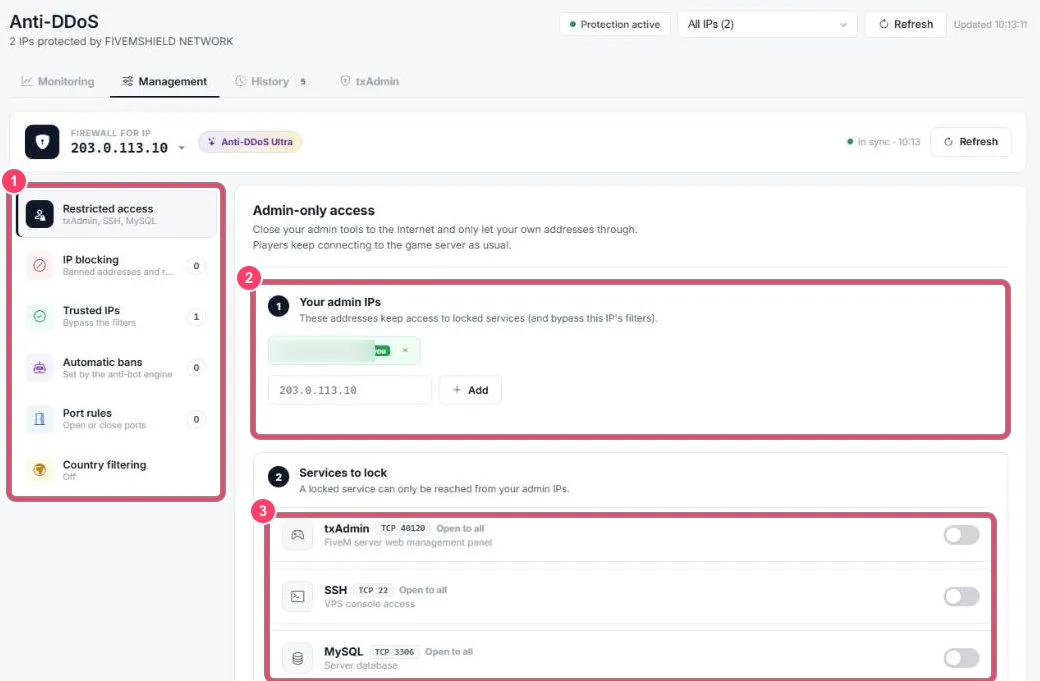
-
Firewall menu:
- Restricted access (this page)
- IP blocking
- Trusted IPs
- Automatic bans
- Port rules
- Country filtering
The number next to each entry is its rule count. At the top, Firewall for IP picks the IP to configure, and In sync confirms your rules are applied
-
Your admin IPs: the addresses that keep access. Your current address is tagged you. Add your staff’s with the field and Add
-
Services to lock: turn on the switch for txAdmin (40120), SSH (22) and/or MySQL (3306). Open to all then becomes restricted to your admin IPs