
Access your database (phpMyAdmin)
Your FiveM VPS comes with a MySQL/MariaDB database, used by frameworks such as ESX, QBCore or ox.
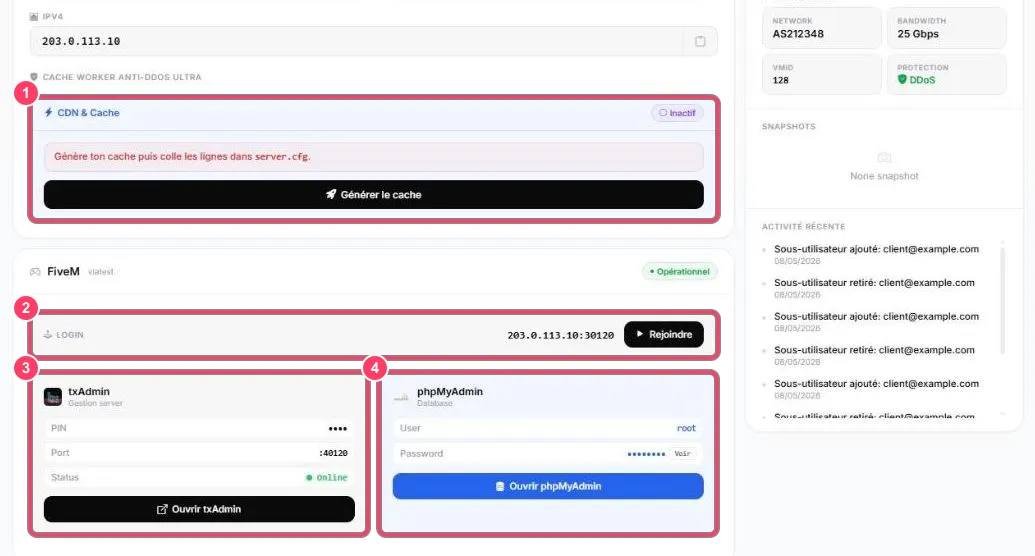
On the VPS dashboard, the phpMyAdmin block (marker 4) shows:
- User: the database user (
root) - Password: hidden by default. Click Voir (Show) to reveal it
Click Ouvrir phpMyAdmin (Open phpMyAdmin) to manage your tables in the browser: import a .sql file, edit a row, export a backup…
To change this password, see Change the database password.
Connect FiveM to the database
Section titled “Connect FiveM to the database”In your server.cfg, the connection string looks like:
set mysql_connection_string "mysql://root:PASSWORD@127.0.0.1/database_name?charset=utf8mb4"Use 127.0.0.1: the database runs on the same VPS as the FiveM server.