
Startup settings
The Startup section holds the settings used when your server starts.
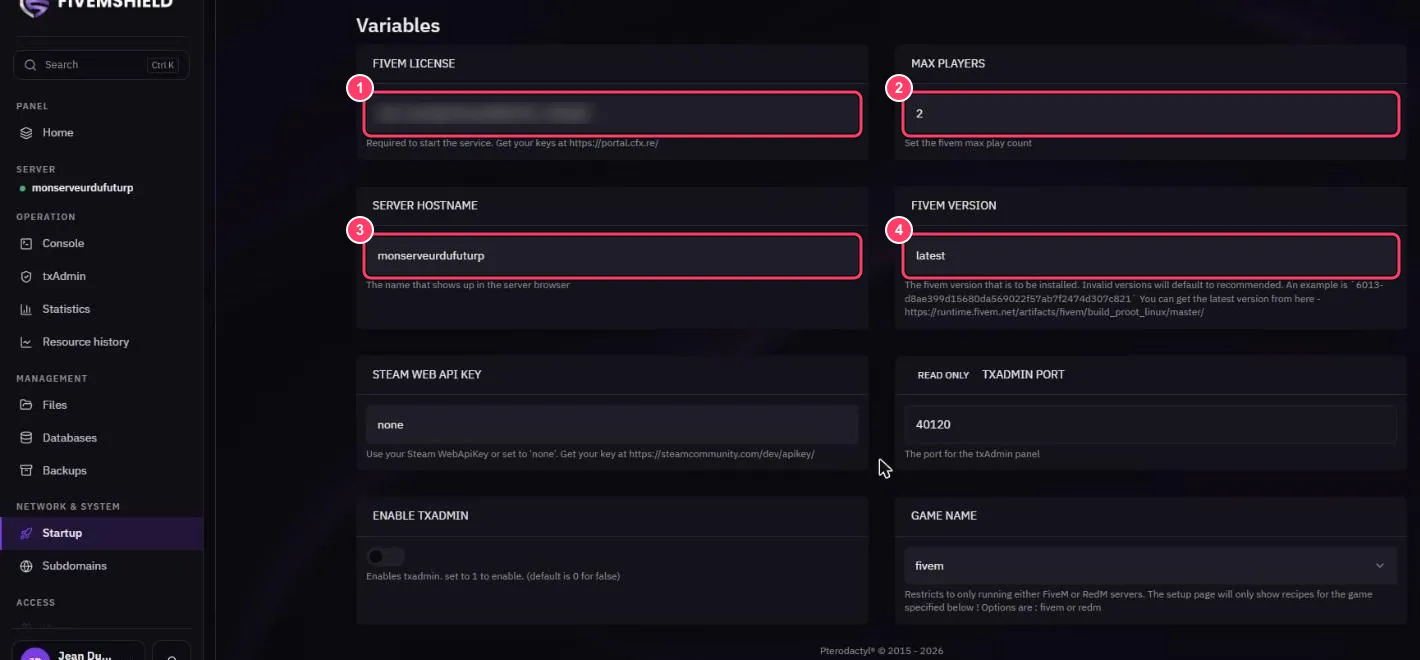
- FIVEM LICENSE: your FiveM license key (
cfxk_…), required to start the server. Create one for free at portal.cfx.re - MAX PLAYERS: your server’s player slots
- SERVER HOSTNAME: the name shown in the FiveM server list
- FIVEM VERSION: the FXServer version installed. Leave
latestfor the newest version, or enter a specific build number
Other variables:
| Variable | Purpose |
|---|---|
| STEAM WEB API KEY | Steam key if you use Steam authentication, otherwise none. Get one at steamcommunity.com/dev/apikey |
| TXADMIN PORT | txAdmin port, assigned automatically (read only) |
| ENABLE TXADMIN | Use the txAdmin page instead |
| GAME NAME | fivem or redm |
Each field saves automatically. Then restart the server to apply your changes.
The server won’t start: “invalid license key”
Section titled “The server won’t start: “invalid license key””- Make sure the key is complete with no spaces
- Check on portal.cfx.re that the key is active
- A key can only be used by one server at a time