
Manage your VPS: the dashboard
In VPS Game, click Manage next to your VPS.
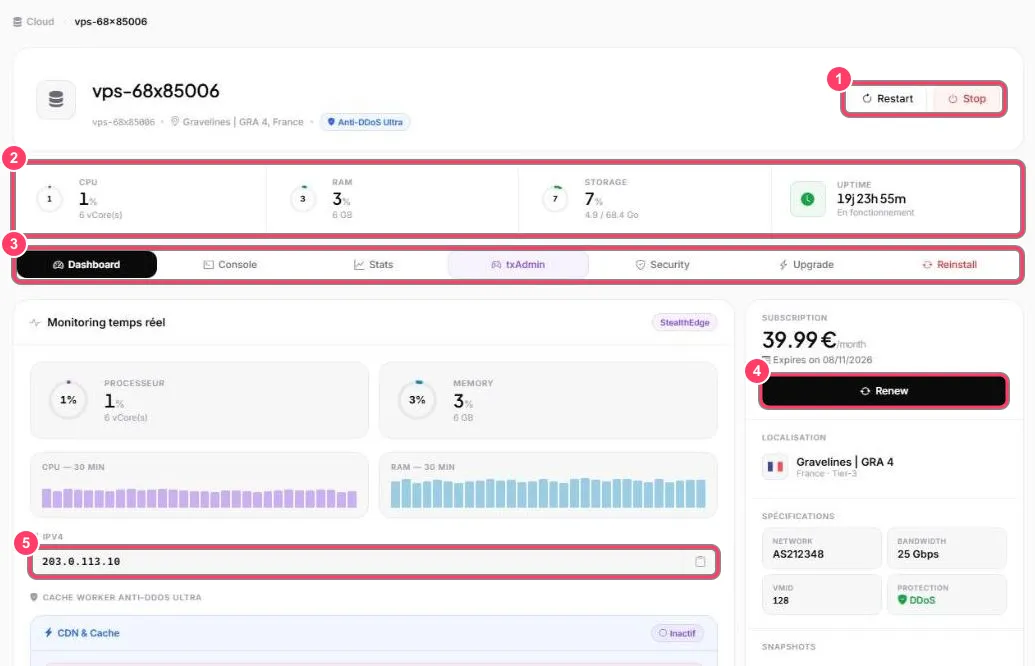
- Restart reboots the VPS, Stop shuts it down. Warn your players: the FiveM server goes offline during the operation
- Resources: CPU, memory and storage usage, and time since the last boot (Uptime)
- Tabs: Console, Stats, txAdmin, Security, Upgrade and Reinstall
- Renew extends the subscription. The expiry date is just above
- IPv4: your VPS IP address, with a button to copy it
Further down the same page:
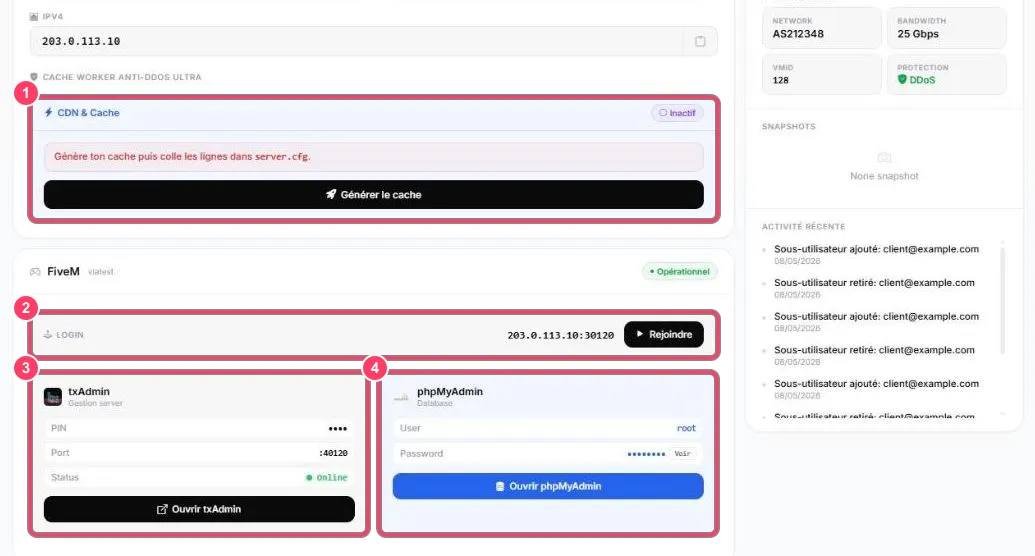
- Anti-DDoS Ultra cache worker: see the VPS CDN cache
- Login: the FiveM connect address (
IP:30120). Rejoindre (Join) launches FiveM straight onto your server - txAdmin: PIN, port and status. See txAdmin on a VPS
- phpMyAdmin: access to your database. See phpMyAdmin
The right-hand column also shows the location, the specifications (network, bandwidth, protection), snapshots and the VPS’s recent activity.