
Open and track a ticket
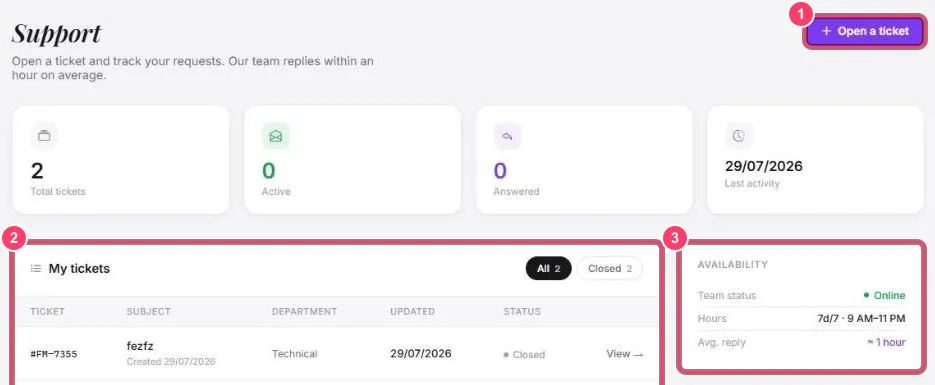
- Open a ticket: start a new request
- My tickets: your tickets, with number, subject, department, last update and status. View → opens the conversation
- Availability: support answers 7 days a week, 9 AM to 11 PM, in about 1 hour on average
Open a ticket
Section titled “Open a ticket”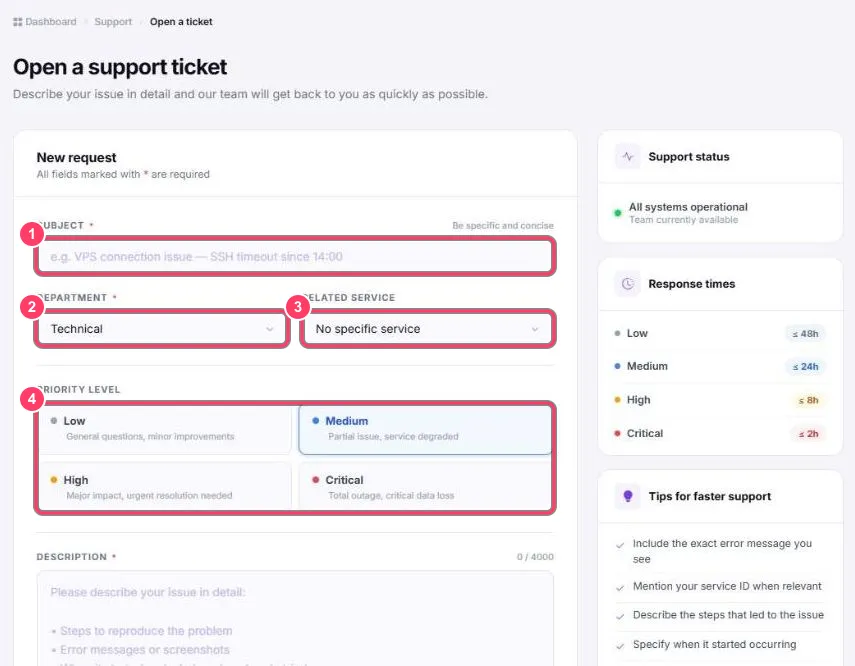
- Subject: a precise title, for example “SSH connection failing since 2 PM”
- Department: Technical (technical issue), Sales (sales questions, custom offers) or Billing (payments and invoices)
- Related service: the service concerned, if any
- Priority level: choose honestly, it helps the team handle emergencies first:
- Low: general question (answer within 48 h)
- Medium: partial issue, degraded service (within 24 h)
- High: major impact, urgent (within 8 h)
- Critical: service fully down or data loss (within 2 h)
Then describe the issue (4000 characters max, Markdown supported), attach up to 5 screenshots (5 MB each) and click Submit ticket.
You can also reach us on Discord.