
Add your own domain
By default, your players connect with the proxy address (rev123456.xdpfilter.net). You can add up to 3 custom domains so they use yours instead, for example play.myserver.com. The SSL certificate is created automatically.
What you need: a domain name and access to its DNS zone (Cloudflare, OVH, Gandi, IONOS, Namecheap…). Allow 10 to 30 minutes overall.
1. Add the domain
Section titled “1. Add the domain”Open your Reverse Proxy’s Domains tab, type your domain under Custom domains and click Add.
2. Create the CNAME and the ownership TXT
Section titled “2. Create the CNAME and the ownership TXT”The domain shows up with the PENDING status and two records to create:
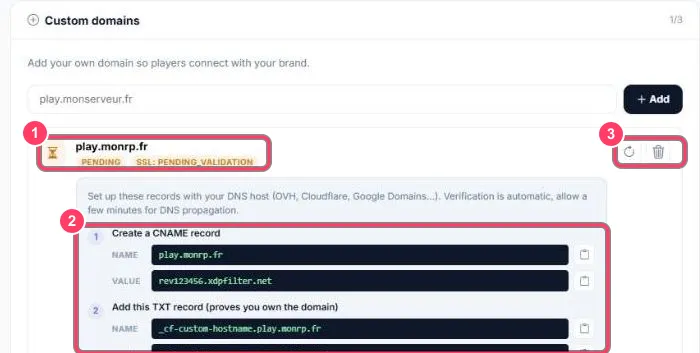
- Status: PENDING (awaiting verification) and SSL: INITIALIZING then PENDING_VALIDATION
- The records to create at your DNS host. The 📋 button next to each value copies it
- ↻ re-runs the check, 🗑️ deletes the domain
| # | Type | Name | Value | Purpose |
|---|---|---|---|---|
| 1 | CNAME |
play.myserver.com |
rev123456.xdpfilter.net (your proxy address) |
Points the domain to the proxy |
| 2 | TXT |
_cf-custom-hostname.play.myserver.com |
an ID like 1a2b3c4d-… |
Proves you own the domain |
Verification is automatic. After a few minutes the status switches to ACTIVE.
3. Create the SSL certificate TXT
Section titled “3. Create the SSL certificate TXT”As soon as the domain is ACTIVE, one last record shows up for the SSL certificate:
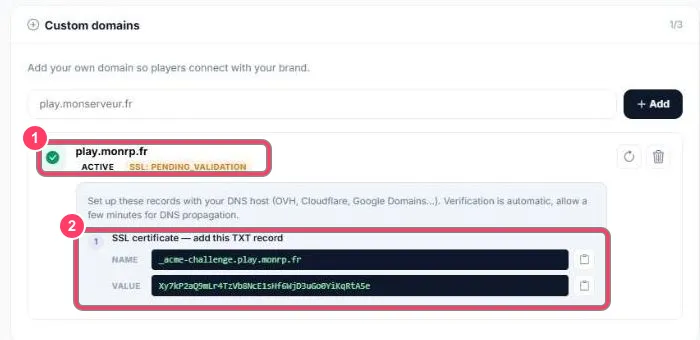
- The domain is ACTIVE, the certificate is SSL: PENDING_VALIDATION
- Create this
TXT:
| Type | Name | Value |
|---|---|---|
TXT |
_acme-challenge.play.myserver.com |
the value shown (a long string of letters and digits) |
The certificate authority checks this record then issues the certificate. This can take from a few minutes to an hour. The SSL status then switches to ACTIVE.
4. Use the domain
Section titled “4. Use the domain”Your players can connect with:
connect https://play.myserver.com/Update the address on your Discord, website and announcements. The rev123456.xdpfilter.net address keeps working alongside.
Common pitfalls
Section titled “Common pitfalls”- Domain on Cloudflare: set the
CNAMEto DNS only (grey cloud), not “Proxied” - Old record: delete any existing
AorAAAArecord on the same name, it conflicts with theCNAME - Value copied wrong: use the portal’s 📋 button rather than copying by hand. Some DNS hosts add quotes around
TXTvalues: that’s normal - Nothing happens after 30 minutes: check your records on dnschecker.org, then click ↻